Every guide to Japanese travel SIMs tells you the same thing: budget one to two gigabytes a day. I went looking for where that number comes from. One of the largest pocket-WiFi rental companies in Japan says it straight out — it is the figure that keeps coming up on travel forums and in comparison guides. That is not a measurement. That is an echo.
Here is a number that is measured. Ericsson’s Mobility Report, which aggregates real traffic across real networks, puts the global average at 22 GB per month per active smartphone at the end of 2025 — about 0.72 GB a day. North East Asia sits at 23 GB a month. Those are people living their entire lives on their phones: commuting, streaming, working. The travel industry is telling you that you, a visitor, will use two to three times what a resident uses.
You might. But it depends almost entirely on one setting, and it is not the one you think.
I walk Tokyo constantly. I work in property development here, and a day off means eight hours outside with Google Maps open, photographing buildings, looking up architects mid-street, and finding a building I half-remember from a magazine. If anyone is going to blow through a data plan, it is me. So I worked out where the megabytes actually go on a day like that, and what plan I would tell a visiting friend to buy.
The short version: navigation is not the problem, and offline maps will not save you.
The thing that breaks most people’s plan
The standard advice is to download offline maps before you go and stop worrying. It is good advice, and it does not do what you think it does.
Google’s own support documentation is unambiguous on this point: when you are offline, “transit, bicycling, or walking directions are unavailable.” Driving directions work. Walking directions do not. Neither does transit routing — which in Tokyo means no train times, no platform numbers, no which of Shinjuku Station’s two hundred exits do I want.
You will find travel blogs claiming walking navigation works offline. It does not, and Google’s documentation is the authority here, not a blog post.
So what do offline maps give you? The map itself, and your blue dot on it. That is genuinely useful — you can see where you are and read street names — but it is a paper map with a GPS pin, not a navigator. For an architecture walk, where the entire activity is getting to a specific address you have never been to, that is the wrong half of the feature.
Download them anyway. Central Tokyo runs somewhere around 150–200 MB, so do it on hotel WiFi, not on your plan. Just do not treat it as your connectivity strategy.
Where the data actually goes on a walking day
I have separated these by how much I trust the number, because the honest answer is that this subject is one of the most commercially captured topics on the internet. Almost every “how much data will I use” article is published by a company that sells data.
Navigation: much smaller than you have been told
The only source I could find with a disclosed method — WhistleOut, testing turn-by-turn navigation across ten trips with a data-monitoring app — measured 0.73 MB per twenty minutes. That is roughly 2 MB an hour. Their test was driving rather than walking, and it dates to an older version of Maps, so treat it as a floor rather than a precise figure. Vendor blogs quote 5–10 MB an hour; none of them show their working.
Take the generous end. Four hours of active navigation on a full architecture walk is somewhere between 10 and 40 MB. On the Omotesando route I mapped out, which is twelve buildings across about two hours of actual walking, you are looking at single-digit megabytes.
Read that again, because it reframes the whole question. The thing you are most afraid of running out of data for costs you about as much as loading one news homepage.
Searching costs more than navigating — every time you type a new building name and the map redraws with fresh tiles and photos, you pull down more than the route itself. But it is still not where your gigabytes go.
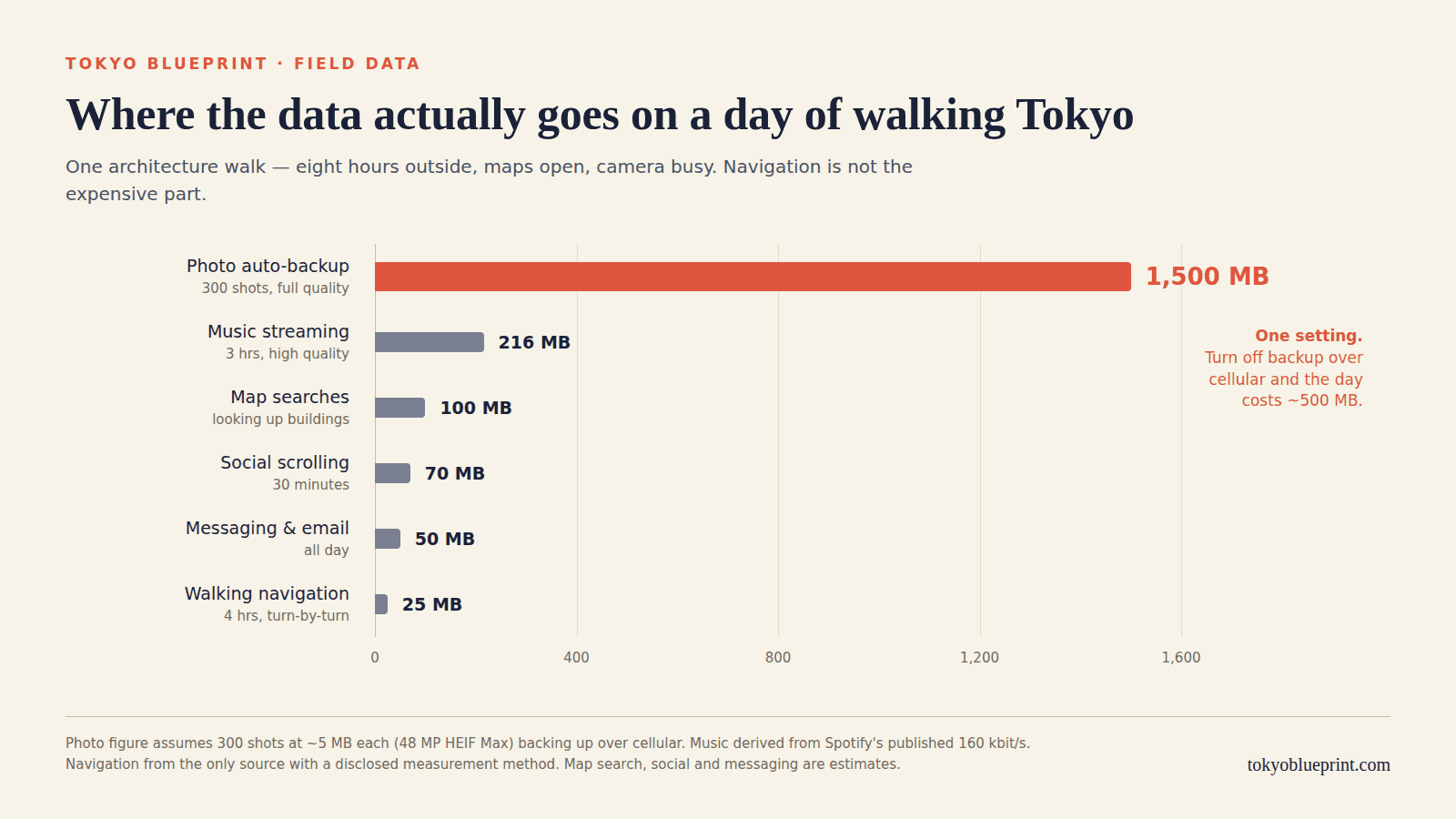
Photos: this is the entire ballgame
Here is the number that decides your plan.
A 48-megapixel photo on a recent iPhone, shot in HEIF Max, is about 5 MB. Two outlets measured this independently and agree. If you shoot ProRAW, it is 75–100 MB per frame. Standard 24-megapixel HEIC lands somewhere in the 2–5 MB range depending on the phone — I could not find a source I trust for that one, so treat it as a rough band.
Now: I take between 200 and 400 photos on a proper building day. That is not unusual for anyone who came to Japan for the architecture. At 5 MB a frame, four hundred photos is 2 GB.
If iCloud Photos or Google Photos is backing up over cellular, that entire 2 GB goes out over your travel eSIM, in the background, while you are looking at a wall.
Neither Apple nor Google states clearly in their documentation whether cellular backup is on by default, which is a slightly astonishing gap for something with this much financial consequence. So do not take anyone’s word for it, including mine — go into the settings on your own phone and look.
This single setting is the difference between a 5 GB plan lasting a fortnight and a 20 GB plan dying in four days.
If you do want backup while travelling — and there is a real argument for it, since a stolen phone in a foreign country is a bad place to discover your holiday only existed locally — Google Photos’ “Storage saver” mode caps uploads at 16 megapixels, and “Express” caps them at 3. Express is genuinely tiny. Use it as travel insurance rather than as your archive, and re-upload the originals when you are home on WiFi.
Everything else
Rough figures, and I will tell you how solid each one is:
- Music. Spotify publishes its bitrates: 96 kbit/s on Normal, 160 on High, 320 on Very High. That works out to about 43, 72 and 144 MB an hour respectively. The arithmetic is deterministic, so these are reliable. Three hours of walking music on High is around 216 MB — more than your entire day of navigation, several times over. Download your playlists on hotel WiFi.
- Instagram. Roughly 120–160 MB an hour of browsing, 250–300 MB an hour for Reels. These come from a carrier’s published estimate and are explicitly labelled as estimates — Instagram exposes no in-app data counter, so nobody can measure it without a packet capture, and as far as I can tell nobody has published one. Treat them as the right order of magnitude and no more.
- Translation and lens. Pointing your camera at a Japanese sign to read it is one of the genuinely great uses of a phone in Japan, and I could not find a single credible figure for what it costs. My working assumption is that it is small and occasional. If you are worried, Google Translate lets you download language packs for offline use, and the camera mode works offline for some languages.
A real day, added up
| Activity | Data | How solid is this |
|---|---|---|
| 4 hrs walking navigation | 10–40 MB | Measured floor, generous ceiling |
| Building searches, map redraws | 50–150 MB | Estimate |
| 3 hrs music streaming (High) | ~216 MB | Reliable, derived from published bitrate |
| 30 mins social scrolling | 60–80 MB | Estimate |
| Messaging, email, a couple of tickets | ~50 MB | Estimate |
| Subtotal, backup off | ~400–540 MB | |
| 300 photos auto-backing up at full quality | +1,500 MB | Reliable per-photo figure |
| Total, backup on | ~1.9–2.0 GB |
And there is the industry’s “1 to 2 GB a day” — you can reach the top of that range without trying, and it takes one setting to get there.
The number is not wrong, exactly. It is just describing a phone that is uploading your camera roll over cellular, and quietly declining to mention that this is a setting you can change.
So how much should you buy
For most people doing a week to ten days in Japan, with photo backup off or set to Express: 5 GB is enough, and 10 GB is comfortable. That is about ten dollars.
Buy more than that if you are travelling with someone who is tethering off your phone, if you will be uploading video, or if you simply do not want to think about it — which is a legitimate thing to pay for and I am not going to talk you out of it.
Buy unlimited if you are shooting ProRAW and backing up as you go. At 75–100 MB a frame there is no fixed-data plan that survives contact with a serious photography day.
Do not buy unlimited because a comparison site told you tourists use 2 GB a day. That is the industry quoting itself.
Which eSIM, and the thing nobody compares
Every comparison table you will find lists price, data and validity. Almost none of them list the one specification that determines whether the thing works in a subway tunnel: which Japanese network the eSIM actually roams on.
Japan has four networks — NTT docomo, KDDI (au), SoftBank and Rakuten Mobile. The first three have had coverage inside Tokyo Metro tunnels, not just at platforms, since 2013, delivered over shared leaky-coaxial infrastructure. Rakuten arrived much later and is still catching up: their own published schedule, updated in February 2026, still had Hibiya Line stations landing between April and July 2026, and Marunouchi, Namboku, Mita and Shinjuku Line stations listed as August 2026 onward.
Here is what the three providers I can actually recommend are riding on, checked against each provider’s own plan data on 2 August 2026:
Here is what the three providers I can actually recommend are riding on, checked against each provider’s own plan data on 2 August 2026.
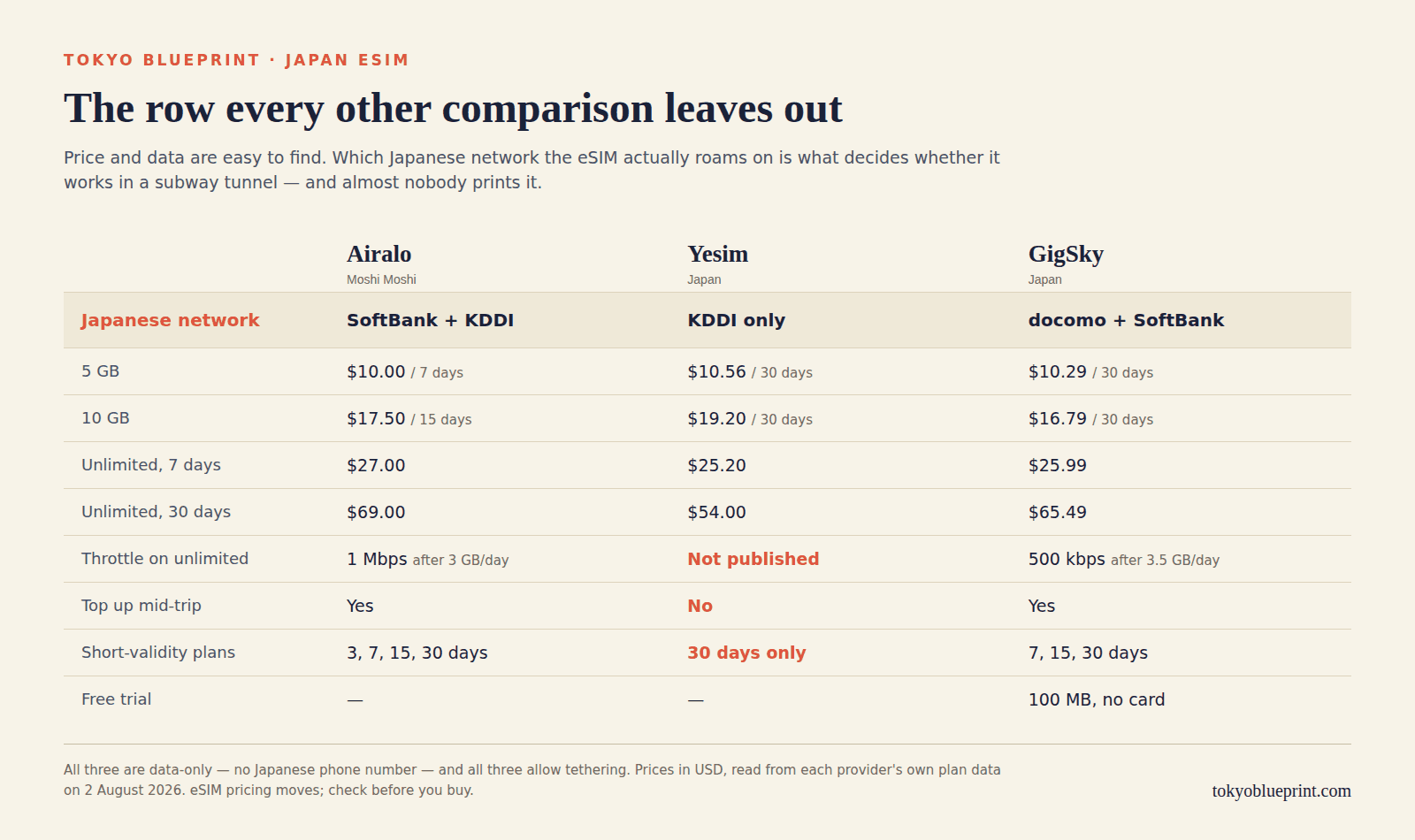
The same figures in text, so they are searchable and screen-readable:
| Airalo (Moshi Moshi) | Yesim | GigSky | |
|---|---|---|---|
| Japanese network | SoftBank + KDDI | KDDI only | docomo + SoftBank |
| 5 GB | $10.00 / 7 days | $10.56 / 30 days | $10.29 / 30 days |
| 10 GB | $17.50 / 15 days | $19.20 / 30 days | $16.79 / 30 days |
| Unlimited, 7 days | $27.00 | $25.20 | $25.99 |
| Unlimited, 30 days | $69.00 | $54.00 | $65.49 |
| Unlimited throttle | 1 Mbps after 3 GB/day | Not published | 500 kbps after 3.5 GB/day |
| Top up mid-trip | Yes | No | Yes |
| Tethering | Yes | Yes | Yes, uncapped |
| Short validity options | 3, 7, 15, 30 days | 30 days only | 7, 15, 30 days |
Prices in USD, taken from each provider’s own site and current at the time of writing. eSIM pricing moves, so check before you buy.
A few things that table does not say out loud.
Yesim is the cheapest unlimited by a clear margin, and it has two catches. It runs on KDDI alone, and it does not publish its fair-use threshold anywhere I could find — so you are buying “unlimited” without being told at what point it stops being fast. It also cannot be topped up. Run out and you buy a whole new plan. If the price difference matters to you, it is a real option; just know what you are accepting.
GigSky has a free 100 MB trial for Japan. No card required. If you have never installed an eSIM and want to prove your phone works before you commit, that is a genuinely useful thing to exist, and I have not seen another provider offer it.
Airalo is what I would put on my own phone, for three reasons. It is on two networks rather than one, which matters underground. If you run low you top up in the app rather than buying a fresh plan. And its unlimited plans throttle to 1 Mbps rather than 500 kbps, which is the difference between “maps still work” and “maps sort of load eventually.” Its short-validity options also fit an actual holiday — a 3 GB, 7-day plan for eight dollars is the right shape for a week, and its competitors mostly sell you thirty days whether you want them or not. Airalo’s Japan plans are here.
None of the three give you a Japanese phone number. All are data-only. For most travellers that is fine — restaurant bookings increasingly run through apps, and calls go over LINE or WhatsApp. If you specifically need a Japanese number for a reservation system, that is an argument for a physical SIM from a Japanese provider instead.
What I would not buy, and why
Pocket WiFi. A rental router from Ninja WiFi runs ¥770 a day for 3 GB, or ¥1,980 a day for their unlimited plan; Sakura Mobile’s unlimited router is ¥18,300 for a fortnight. For a solo traveller that is four to ten times the cost of an eSIM, and you are carrying a second device that needs charging, and you have to be somewhere specific to collect it and post it back. Ninja WiFi will charge you ¥40,000 if you lose it and did not take the insurance.
It genuinely makes sense for one case: a group of three or more sharing one connection, where the per-person cost collapses and one person’s phone isn’t being drained as everyone’s hotspot. For a couple it is roughly a wash. For one person it is a bad deal.
Roaming day passes. AT&T and Verizon both charge $12 a day for Japan. Two weeks is $168. Airalo’s 20 GB, 15-day plan is $24. The exception is T-Mobile, whose plans include international data with no day fee at all — on Go5G Next you get 15 GB at full speed before dropping to 256 kbps. If you are on T-Mobile, check what you already have before buying anything; you may not need this article. Everyone else is being charged a convenience premium of roughly seven times.
A physical SIM from the airport. Not a bad option, and cheaper than people assume — b-mobile’s visitor SIM is ¥1,980 for 5 GB over ten days. But you are queuing at a counter after a long-haul flight, and you have to physically remove and safely store your home SIM, which is precisely the moment you are least equipped to look after a two-millimetre piece of plastic. If your phone is US-market and eSIM-only, this option does not exist for you anyway.
Free public WiFi as a plan. This has got materially worse, and most guides have not caught up.
The Japan Connected-free Wi-Fi app — the one nearly every English-language Japan guide still recommends — was shut down on 31 March 2025. Its replacement, Japan Wi-Fi auto-connect, is alive and actively maintained, supports OpenRoaming, and is genuinely worth installing before you fly. But install it at home: registration needs an internet connection, which is a memorable thing to discover at Narita.
Tokyo Metro’s station WiFi, which covered 61 stations, has been suspended since 1 July 2026 for equipment upgrades, with no announced return date. Their on-train WiFi died years ago. Toei’s free WiFi exists at five stations. Convenience-store WiFi has largely disappeared — 7-Eleven and FamilyMart shut theirs in 2022, and Lawson appears to still be running, though I could not confirm it from a working page on their site. Starbucks still works reliably.
TOKYO FREE Wi-Fi, run by the metropolitan government, is real and has no session limit — but first-time registration requires a Google, Apple or LINE account plus installing a configuration profile, and takes about five minutes. Do it before you arrive or it is useless when you need it.
Treat free WiFi as a hotel amenity and an emergency fallback. Not as a way to find a building.
Setting it up without getting billed twice
Check your phone can do this at all. On iPhone, eSIM works from the XS, XS Max and XR onward. On Android, dial *#06# — if an EID appears alongside the IMEI, you have eSIM hardware. Pixel 3a and later support it; note that Pixel 10 and later are eSIM-only apart from the 10 Pro Fold. If your iPhone was bought in mainland China, only the 17e and iPhone Air support eSIM at all.
Check your phone is not carrier-locked, which is the single most common reason a travel eSIM fails. On iPhone: Settings → General → About, scroll to Carrier Lock. It should say No SIM restrictions. Anything else and you need to call your carrier — Apple explicitly cannot do this for you, and it can take days. A locked phone will install the eSIM profile perfectly happily and then refuse to connect, which sends people down the wrong diagnostic path for hours.
Install the eSIM before you fly, on your home WiFi. Downloading the profile needs a connection. Install it, then leave the line switched off until you land.
Then, and this is the step that saves money: turn data roaming off on your home line. On iPhone, tap your home line under Settings → Cellular, and switch Data Roaming off. It is a per-line setting, not a global one, which catches people out.
And the trap almost nobody mentions. On iPhone, under Settings → Cellular → Cellular Data, there is a switch called Allow Cellular Data Switching. If it is on, iOS will quietly fall back to your home line — roaming, at your carrier’s rates — whenever the travel eSIM’s signal dips. Which, if you are walking around Tokyo, includes every basement, lift and deep subway platform. Turn it off.
What it is actually like underground
Because you will be underground constantly, and it is the question I get asked most.
LTE works in Tokyo Metro and Toei tunnels, not just at platforms, and has since March 2013. You can hold a conversation on a video call between Omotesando and Shibuya. 5G is a different story: docomo was targeting 5G at more than 60% of Tokyo Metro stations by the end of April 2026 and describes the tunnels themselves as the next challenge, with no completion date. So expect your phone to sit on 5G at the platform and drop to LTE the moment the train moves. This is fine. LTE is fine.
There is no published map of dead zones in central Tokyo, and I am not going to invent one. Above ground, docomo, au and SoftBank coverage in the city centre is effectively total. The genuine gaps are the ones with documentation behind them: Rakuten’s unfinished subway build-out, stations under renovation where antennas have been temporarily moved, and cloud-SIM eSIMs that reconnect slowly underground because they attach by international roaming agreement rather than a direct domestic subscription.
That last one is worth a sentence. All three providers above use direct network agreements. Some cheaper eSIMs — particularly the ones advertising coverage in 200 countries from a single profile — do not, and the symptom is exactly what you do not want: it works fine on the street and dies in the station.
The five-minute version
If you skipped to the end:
- Turn off photo auto-backup over cellular, or set Google Photos to Express. This single setting is worth more than any plan you can buy.
- Download offline maps and your music on hotel WiFi. Understand that offline maps will not give you walking directions.
- Buy 5–10 GB, not unlimited, unless you shoot RAW.
- Check Carrier Lock says “No SIM restrictions” before you buy anything.
- Turn off Allow Cellular Data Switching so your home line cannot roam behind your back.
Then stop thinking about it and go look at some buildings. If you want somewhere to start, the twelve-stop Omotesando architecture walk is the route I take visiting architects on, and the Azabudai Hills walking guide covers the newest and strangest piece of the city. If you need somewhere to sleep that was designed by someone who cared, ten Tokyo design hotels under ¥30,000 are here.
Some links in this article are affiliate links, which means I earn a small commission if you buy through them, at no extra cost to you. It does not change what I recommend — the reason I suggest a 5 GB plan over unlimited is that it is what the numbers say, and it is the cheaper option, which is the opposite of what an affiliate link would push me toward. Prices and plan details were checked on 2 August 2026 and will move.